White-label OTT platform for IPTV providers

Launch your own branded IPTV app — without building one.

You bring the subscribers. We give you the app, the admin panel and the backend — under your name, your logo and your domain. Your customers never see ours.

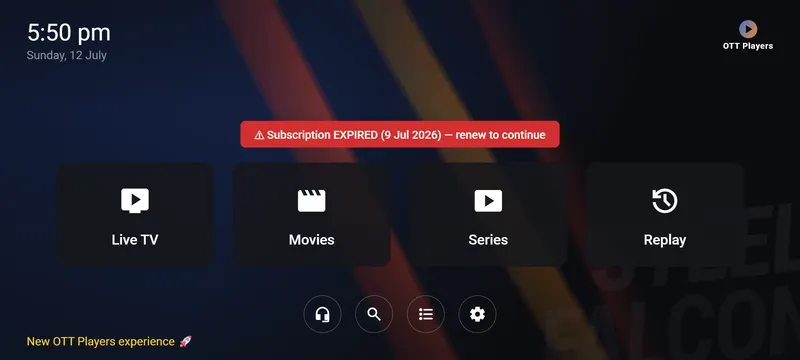
The app's home screen: Live TV, Movies, Series and Replay tiles on a dark background.
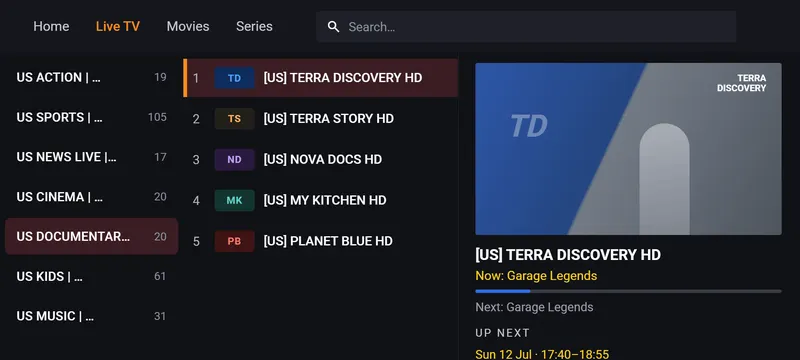
Live TV: category list, channel list and a now-playing preview with the current programme.
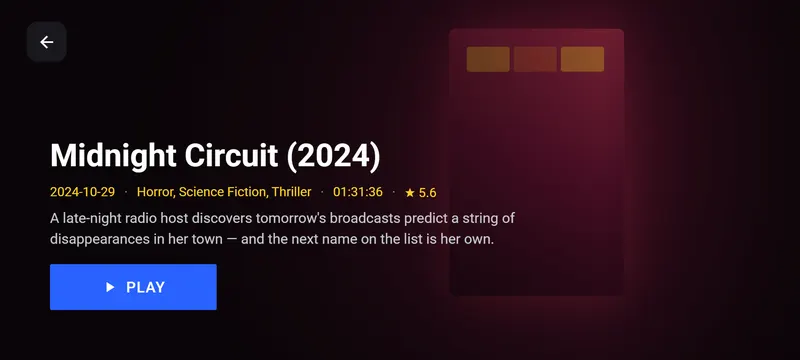
A movie detail page with poster, year, genres, runtime, rating, plot and a Play button.
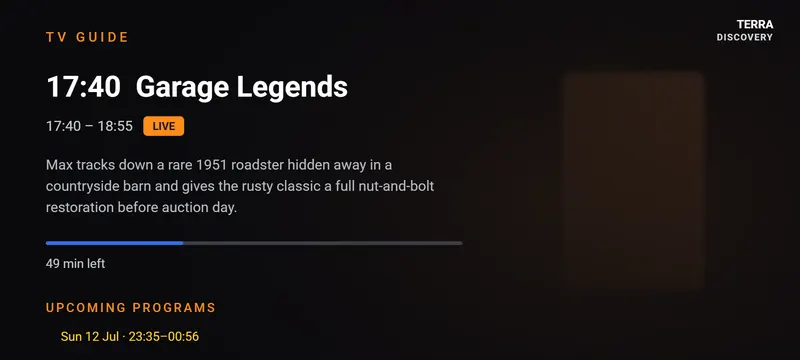
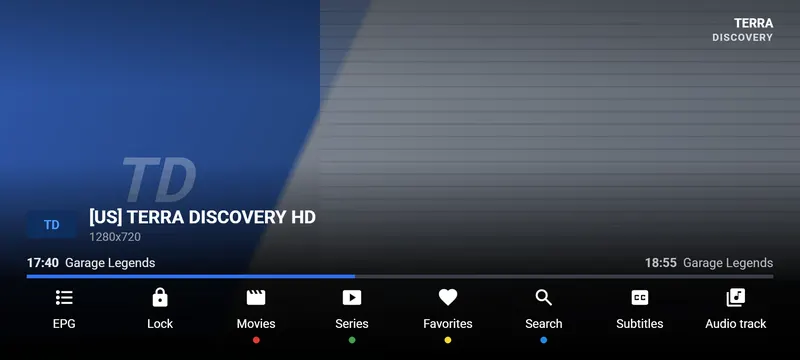
The full-screen player with a channel bar, programme progress and an EPG, Lock, Favourites and Subtitles toolbar.
  • Android TVTV · Box · Phone · Tablet
  • XtreamWorks with your panel
  • 4 languagesEN · FR · ES · AR
  • Your brandOwn name & package

The screens

This is the app your customers will install

Real screens from a live build. Only the name, logo and colours change — the rest is exactly what your subscribers get on day one.

Home screen with Live TV, Movies, Series and Replay tiles, a subscription banner and shortcut icons for support, search, playlist and settings.
Big, remote-friendly tiles. Expiry warnings and your support details, right on the home screen.

Screens from a real build. Your app carries your name, icon and colours.

The platform

Everything you need to sell streaming under your own brand

Three pieces, delivered together and already talking to each other: the app your customers install, the panel you run it from, and the backend that ties them together.

Your own Android app

A complete OTT player — Live TV with a full EPG, Movies, Series, catch-up, favourites and search. Built for the 10-foot experience on TV boxes, and just as at home on a phone.

  • Your app name, icon, colours and splash
  • Your own package ID — a separate app in every sense
  • Points at your backend, not ours
The app's home screen inside a dark TV interface.

Admin panel

Devices, lines, resellers, branding and updates — all from one dashboard you own.

Device control

Pair by QR, then block, restore or remove any device instantly — enforced on every launch.

Push updates

Upload a new build and every install can update itself. No store review, no reinstalls.

Live re-skin

Change the logo, accent colour, text colour and footer from the panel. Applied on next launch — no rebuild.

Instant browsing, even on a cheap box

The catalogue is downloaded once and cached on the device, so channels, movies and series open immediately instead of spinning on every screen. Hardware decoding by default keeps playback smooth on low-end TV boxes.

The app

What your subscribers get

Everything a modern IPTV customer expects — and the things that quietly cause support tickets when they're missing.

Live TV that behaves like a TV

Categories down the left, numbered channels in the middle, and a preview of what's playing right now — with the next programme underneath. Search finds a channel in two keystrokes.

  • Now & next, straight from your EPG
  • Channel numbers, favourites and recents
  • Switch channels without leaving full screen
Live TV screen with categories, a numbered channel list and a now-playing preview.

Movies & Series people actually browse

Poster walls with backdrops, plot, rating and runtime. Season and episode lists that remember where each viewer stopped, and a continue-watching row that brings them back.

  • Artwork and metadata fetched automatically
  • Resume and continue-watching per device
  • Catch-up / replay wherever your provider has archive
Movie detail page with plot, genres, rating and a Play button.

A player with everything one button away

The guide, favourites, search, subtitles and audio track are all reachable from playback — colour-keyed to the coloured buttons on the remote your customers already hold.

  • Programme progress and what's on next, on screen
  • Subtitle and audio-track picker
  • Hardware decoding — smooth on low-end boxes
Full-screen player with a channel bar and a toolbar of player controls.

Parental controls

PIN-lock categories or single titles. You can set a master reset code from the panel, so a forgotten PIN isn't a support call.

4 languages built in

English, French, Spanish and Arabic — including right-to-left layout. The app follows the device language automatically.

ISP-block resistance

Encrypted DNS and an optional tunnel help streams keep working on networks that block IPTV domains.

Onboarding & branding

Easy for them to start. Easy for you to change.

The two screens that decide whether a customer sets the app up on their own — or phones you.

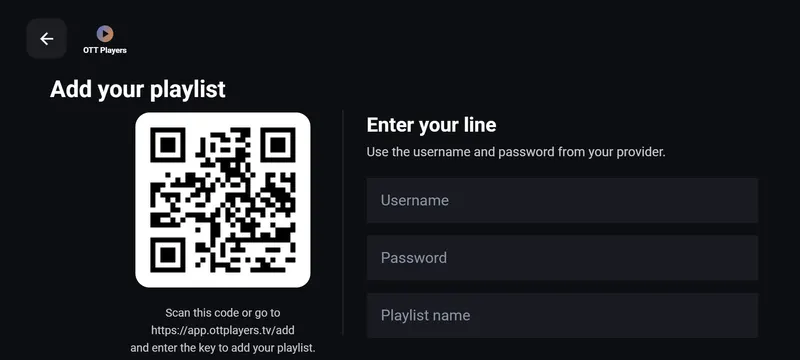
Add playlist screen with a QR code and username, password and playlist name fields.

Pairing that a customer can do alone

They scan the QR with a phone, or type a 6-character key on your web page, and the line attaches itself. If they'd rather type credentials, they still can — but almost nobody does.

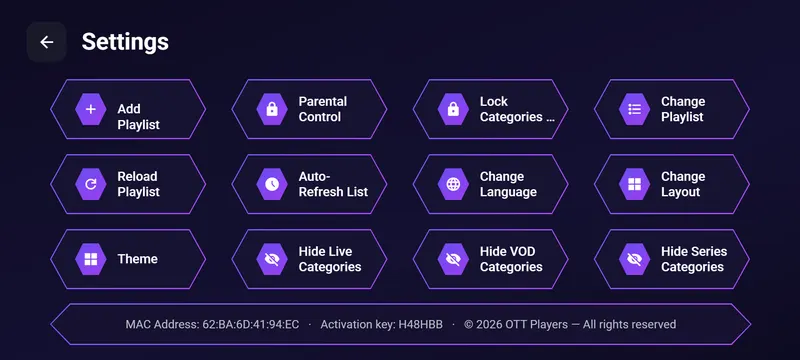
Settings screen with tiles for parental control, theme, layout, language and hiding categories.

Themes, layouts and locks they control

Viewers pick a theme and a home layout, hide categories they never watch and PIN-lock the ones the kids shouldn't see. Your brand colours stay in charge of the palette.

The panel

Run the whole operation from one dashboard

No SSH, no database, no developer. Everything an operator actually does day to day is a button.

  • Lines & devices — see every paired device, its MAC, key, playlist, expiry and last seen.
  • Block / restore / remove — enforced on the device at next launch, and it can't be bypassed offline.
  • Branding — logo, accent colour, text colour and footer, applied live to installed apps.
  • Messages & footer — push an on-screen notice or a scrolling ticker to every device.
  • Support block — your WhatsApp/Telegram QR shown inside the app.
  • App updates — upload an APK; the version is read from the file so it can't be mis-typed.
  • Resellers & stream hosts — plus a bulk host swap when a domain gets blocked.
Book a walkthrough

How it works

From first call to live app

You keep your panel, your lines and your customers. We wrap them in an app that carries your name.

  1. 1

    Send us your brand

    Your name, logo, colours and the domain you want the app to talk to. That's all we need to start.

  2. 2

    We build & deploy

    You get a signed APK under your own package ID, your backend on your subdomain, and your admin panel.

  3. 3

    Your customers pair

    They install the app, scan a QR or type a 6-character key, and their line is attached. No typing URLs.

  4. 4

    You run it

    Add lines, block devices, change branding and push updates from the panel — on your own, whenever you like.

Reach

One app, every screen your customers own

Android TVSmart TVs
TV boxesAny Android box
PhonesAndroid 6+
TabletsPortrait & landscape
Fire TVSideload ready

Pricing

One-time payment. No monthly fees. No revenue share.

We never touch your subscribers or your billing. You keep 100% of what you sell.

Starter

One brand, sideloaded

$150one-time

No monthly fees

  • Your branded Android app (APK)
  • Backend on your subdomain
  • Admin panel
  • Unlimited devices
  • Self-hosted updates
  • Email support
Choose Starter

Custom

Multi-brand & agencies

Let's talk

Volume pricing

  • Multiple brands from one contract
  • Your own servers, if you prefer
  • iOS / web player on request
  • Custom features
  • SLA & onboarding
Talk to us

One-time payment, no recurring fees — ask for a quote. We don't resell channels or subscriptions; you bring your own Xtream panel and lines.

FAQ

The questions everyone asks

Do you sell channels or IPTV subscriptions?

No. We sell the software — the app, the panel and the backend. You bring your own Xtream panel and your own lines. We never see or touch your content.

Is it really my app, or yours with a logo swapped?

It's genuinely yours: your own package ID, your own signing key, your own app name and icon, pointing at your own backend domain. It installs alongside any other app and nothing in it mentions us.

Will it work with my panel?

If your panel speaks Xtream Codes — which almost all do — yes. Your customers log in with the same username and password you already give them, or you attach the line for them from the panel.

How do customers install and activate it?

They install the app, and it shows a QR code and a 6-character key. They scan it (or type the key on your web page) and the line attaches itself. No URLs, no MAC hunting, no typing credentials on a TV remote.

Can I cut off a customer who stops paying?

Yes — block or remove the device from the panel and the app locks them out on the very next launch, with your support details on screen. Going offline doesn't get around it.

Can I change the look without a new build?

Logo, accent colour, text colour, footer, home backdrop and on-screen messages are all set from the panel and applied live. A new build is only needed for a new app name or icon.

How do updates reach my customers?

You upload the APK in the panel and installed apps offer the update themselves. The version is read straight from the file, so a mis-typed number can't put everyone in an update loop.

Can I put it on the Google Play Store?

On the Pro plan we prepare a Play-compliant build and walk you through publishing. Note that Play has rules about IPTV content — we'll be straight with you about what does and doesn't pass.

How long does it take?

Typically a few days from receiving your brand assets and domain. Rush delivery is possible — ask.

Get started

Tell us about your service

Send a few details and we'll come back with a quote and a live demo of the app running on a real TV box. No obligation.

Fastest way for us to reach you.

We reply within one business day. Your details are never shared.